
Run this notebook yourself!
Download the executed notebook: 4_torchvision.ipynb! See the button at the top right to download as markdown or pdf.
Synthesizing Deep Net Model Metamers#
plenoptic is compatible with any model written in pytorch, including deep neural networks from the model zoos timm and torchvision. In this exercise, we’ll grab ResNet50 from torchvision and show how to generate metamers for several of its intermediate representations, as done in Feather et al. 2023.
Attention
It is recommended that you first work through the Minimal metamer synthesis example exercise before this one! The optimization procedure here is a bit more complex and takes longer.
# needed for the plotting/animating:
import matplotlib.pyplot as plt
import plenoptic as po
import torch

plt.rcParams["animation.html"] = "html5"
# use single-threaded ffmpeg for animation writer
plt.rcParams["animation.writer"] = "ffmpeg"
plt.rcParams["animation.ffmpeg_args"] = ["-threads", "1"]
# so that relative sizes of axes created by po.plot.imshow and others look right
plt.rcParams["figure.dpi"] = 72
DEVICE = torch.device("cuda" if torch.cuda.is_available() else "cpu")
import numpy as np
import torchvision
When synthesizing model metamers for convolutional neural networks, researchers often pick a specific layer whose output they want to match. If we look at Feather et al. 2023 Figure 2e, we can see an interesting progression in layers 2 through 4: the layer 2 metamer looks almost identical to the target image, the layer 3 metamer starts to add RGB noise, and the layer 4 is almost completely unidentifiable, looking almost completely like random RGB noise. We’ll pick layer 3 from now, and you’re encouraged to try the other layers!
Warning
The contents of this exercise use features from plenoptic that have not yet been released. The names of the object and its methods may change between now and the release in version 2.1.0, later this July.
If you followed the setup instructions, you will be able to run this notebook without any issues, but if you install plenoptic directly with pip, you will get an AttributeError.
Use a model from torchvision#
First, let’s download the model weights for ResNet50 trained on ImageNet-1K and initialize the torchvision model.
weights = torchvision.models.ResNet50_Weights.IMAGENET1K_V1
deepnet = torchvision.models.resnet50(weights=weights)
Downloading: "https://download.pytorch.org/models/resnet50-0676ba61.pth" to /home/jenkins/agent/workspace/eurorse_plenoptic-workshops_main/.cache/torch/hub/checkpoints/resnet50-0676ba61.pth
0%| | 0.00/97.8M [00:00<?, ?B/s]
23%|██▎ | 22.5M/97.8M [00:00<00:00, 235MB/s]
50%|█████ | 49.2M/97.8M [00:00<00:00, 261MB/s]
78%|███████▊ | 76.1M/97.8M [00:00<00:00, 270MB/s]
100%|██████████| 97.8M/97.8M [00:00<00:00, 268MB/s]
Next, we ensure that our model is in evaluation mode. Many models, including ResNet50, behave differently when in training and evaluation mode. In plenoptic, models are fixed and so we want the evaluation behavior:
deepnet.eval();
Next, we grab the preprocessing transform from the model. As the torchvision docs explain it (quoting version 0.27):
Before using the pre-trained models, one must preprocess the image (resize with right resolution/interpolation, apply inference transforms, rescale the values etc). There is no standard way to do this as it depends on how a given model was trained. It can vary across model families, variants or even weight versions. Using the correct preprocessing method is critical and failing to do so may lead to decreased accuracy or incorrect outputs.
For models trained on ImageNet, this preprocessing consists of two steps: resizing to a height and width of 224 pixels and normalizing the color channels (subtracting means and dividing by standard deviations). Following Feather et al. 2023 we recommend including the normalization step in the model for metamer synthesis, but handling the image resizing externally. Below, we set up the normalization transform, and we resize the image in the next section.
transform = weights.transforms()
print(transform)
norm = torchvision.transforms.Normalize(transform.mean, transform.std)
ImageClassification(
    crop_size=[224]
    resize_size=[256]
    mean=[0.485, 0.456, 0.406]
    std=[0.229, 0.224, 0.225]
    interpolation=InterpolationMode.BILINEAR
)
What happens if the image resizing is included in the plenoptic model?
If you include the image resizing in the plenoptic model when synthesizing a model metamer, you will clearly see the effect: since the transform crops out the center of the image, the model is completely insensitive to the border, and so it will be unchanged from initialization.
If you’re curious, try it out and see! (Just pass transform instead of norm to DeepNetFeatures model in the block below.)
Finally, we’ll pass our neural network, target layer, and preprocessing transform to plenoptic’s DeepNetFeatures, moving it to our specified device and removing the gradient from all learnable parameters (as models in plenoptic are fixed):
model = po.models.DeepNetFeatures(deepnet, "layer3", norm)
model.to(DEVICE)
po.remove_grad(model)
Preparing the image#
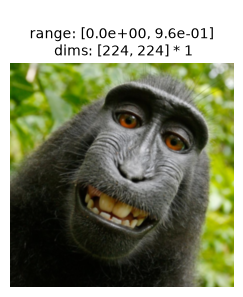
Now, let’s prepare the image. The input image needs to be an RGB image with a height and width of 224 pixels. It should probably also be like those found in ImageNet: a single object in the center of the frame that belongs to one of the image classes. We’ll use one of the famous monkey selfies, and resize it appropriately:
img = po.data.macaque().to(DEVICE)
# here we downsample the original image by a factor of 4 and then lop off the bottom.
# that way, when we take the central 224 pixels in the following block, we end up with a
# decent image.
img = po.process.blur_downsample(img, 2)[..., :-59, :]
As discussed above, models trained on ImageNet should be passed an image of size 224 by 224. We’ll use plenoptic’s plenoptic.process.center_crop() to do so, grabbing the required size directly from the model’s associated transform;
img = po.process.center_crop(img, transform.crop_size[0])
po.plot.imshow(img, as_rgb=True);
Synthesize model metamers!#
Now we can use the above like any other model we’ve used so far, though note that we need to tweak some of the optimization hyperparameters. Here, like in the Feather et al. paper, we find better results if we gradually decrease the learning rate over synthesis (using StepLR to halve the learning rate every 3000 steps). We also use the standard version of Adam, rather than the AMSGrad variant (which is the default in plenoptic).
met = po.Metamer(img, model)
scheduler = torch.optim.lr_scheduler.StepLR
scheduler_kwargs = {"step_size": 3000, "gamma": 0.5}
met.setup(
    optimizer_kwargs={"amsgrad": False},
    scheduler=scheduler,
    scheduler_kwargs=scheduler_kwargs
)
# by setting stop_iters_to_check=max_iter, we ensure it keeps going through
# all iterations
met.synthesize(max_iter=6000, stop_iters_to_check=6000, store_progress=120)
And look at the output:
po.plot.synthesis_status(met, figsize=(15, 4.5));
Clipping input data to the valid range for imshow with RGB data ([0..1] for floats or [0..255] for integers). Got range [-0.00069560995..0.999981].
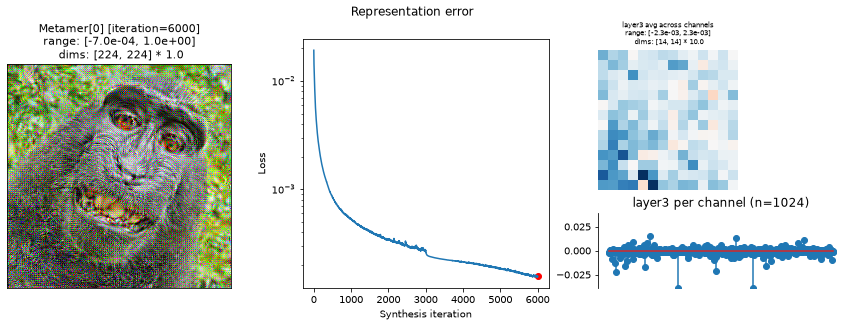
In the above plots, we can see the metamer in the leftmost subplot, the loss over synthesis iterations in the middle, and the representation error on the right:
Our metamer match the results discussed earlier in this notebook: as a layer 3 metamer, it looks like the original image with some RGB noise added.
We can see that the optimization performed reasonably well: the loss decreased gradually over synthesis. If you were using these stimuli in an experiment, it may be worth continuing a bit more to get the loss even lower, but this example demonstrates the point.
The representation error plot has two subplots. The first plots the average across channel (the average spatial representation), while the second averages across space to get a per-channel average representation. We can see that, while there’s variation across both channels and space, there’s not an obvious outlier whose error we have been unable to constrain.
As before, we can animate to see this process over time:
po.plot.synthesis_animate(met, figsize=(15, 4.5))
/home/jenkins/agent/workspace/eurorse_plenoptic-workshops_main/.venv/lib/python3.12/site-packages/plenoptic/plot/synthesis.py:2074: UserWarning: 50 frames of saved metamer clipped: Clipping input data to the valid range for imshow with RGB data ([0..1] for floats). To avoid clipping, use process_image argument.
  warnings.warn(warning_msg)
Understand the output#
The authors of Feather et al., 2023 used two additional checks to verify that metamer synthesis had succeeded (quotes from “Results > Metamer optimization” section, pdf page 5):
“the metamer had to result in the same classification decision by the model as the reference stimulus”
“measures of the match between the activations for the natural reference stimulus and its model metamer at the matched stage had to be much higher than would be expected by chance, as quantified with a null distribution”. The authors used three measures here: Pearson and Spearman correlations and signal-to-noise ratio. We could compute those measures, but without the null distribution, they’re difficult to interpret. So we just note that one should do something similar in order to verify synthesis has succeeded.
The following cell shows how to compute the image categories:
imagenet_categories = np.asarray(weights.meta["categories"])
def get_category(image):
    image_cat = po.to_numpy(
        torch.nn.functional.softmax(deepnet(norm(image)), dim=1).squeeze()
    )
    return imagenet_categories[image_cat.argmax()]

print(f"Original image category: {get_category(met.image)}")
print(f"Model metamer category: {get_category(met.metamer)}")
Original image category: guenon
Model metamer category: guenon
Different layer#
Look at figure 2e in Feather et al. 2023 and pick another layer to target. The hyperparameters we picked should work reasonably well for layers 2 and 4, but others have not been tested. Look at the output of synthesis_status() and tweak the hyperparameters as necessary to get the loss as low as possible!
How do I know what layers I can use?
In this case, you can pick any of the "layerN" used in Feather et al., 2023. You can also view possible layer names with torchvision.models.feature_extraction.get_graph_node_names(). (For more details on the node naming conventions, please see the About Node Names heading in the torchvision documentation.)
from torchvision.models import feature_extraction
# this function returns two lists, the first for training mode, the second for eval mode
feature_extraction.get_graph_node_names(deepnet)[1]
target_layer = # WRITE SOMETHING HERE
model = po.models.DeepNetFeatures(deepnet, target_layer, norm)
model.to(DEVICE)

met = po.Metamer(img, model)
met.setup(
    optimizer_kwargs={"amsgrad": False},
    scheduler=scheduler,
    scheduler_kwargs=scheduler_kwargs
)
# by setting stop_iters_to_check=max_iter, we ensure it keeps going through
# all iterations
met.synthesize(max_iter=6000, stop_iters_to_check=6000, store_progress=120)
po.plot.synthesis_status(met, figsize=(15, 4.5));
You can also specify multiple layers (as a list of strings, e.g., ["layer2", "layer3"]) to match multiple layers at once!
Different target image#
Try using a different target image than the one of macaque above and running metamer synthesis until completion:
Loading other images
Try one of the other included images or use plenoptic.load_images() to load one from disk.
Don’t forget to ensure the image has a height and width of 224! There are many ways you can do this, refer back to Preparing the image for some useful functions included in plenoptic.
new_img = # WRITE SOMETHING NEW HERE
# USE SOME COMBINATION OF DOWNSAMPLING AND/OR CROPPING TO CHANGE THE HEIGHT TO 224 x 224
assert new_image.shape[-2:] == (224, 224), "Image is the wrong shape!"
new_img = new_img.to(DEVICE)
met = po.Metamer(img, model)
met.setup(
    optimizer_kwargs={"amsgrad": False},
    scheduler=scheduler,
    scheduler_kwargs=scheduler_kwargs
)
# by setting stop_iters_to_check=max_iter, we ensure it keeps going through
# all iterations
met.synthesize(max_iter=6000, stop_iters_to_check=6000, store_progress=120)
po.plot.synthesis_status(met, figsize=(15, 4.5));
And maybe animate to see what synthesis looks like?
po.plot.synthesis_animate(met, figsize=(15, 4.5))
Different initial image#
While Feather et al., 2023 initialized from a patch of white noise, it can be interesting to start from a different image as well. Using one of the same tools as above for loading another image, initialize metamer synthesis from another starting point and run it to completion.
As in the previous section, don’t forget to ensure this image has a height and width of 224! There are many ways you can do this, refer back to Preparing the image for some useful functions included in plenoptic.
met = po.Metamer(img, model)
met.setup(
    initial_image=, # WRITE SOMETHING HERE
    optimizer_kwargs={"amsgrad": False},
    scheduler=scheduler,
    scheduler_kwargs=scheduler_kwargs
)
assert met.metamer.shape == met.image.shape, "Initial image is the wrong shape!"
met.synthesize(max_iter=6000, stop_iters_to_check=6000, store_progress=120)
po.plot.synthesis_status(met, figsize=(15, 4.5));
And maybe animate to see what synthesis looks like?
po.plot.synthesis_animate(met, figsize=(15, 4.5))
Different DeepNet#
This setup works for any torchvision model! Pick another model with pre-trained weights and a layer to target, and synthesize some model metamers!
weights = torchvision.models. # WRITE SOMETHING HERE!
deepnet = torchvision.models. # WRITE SOMETHING HERE!
deepnet.eval()
Don’t forget to grab their transform! How exactly this looks will depend on the model, but remember that we recommend any image-resizing transforms be handled externally and everything else be part of the metamer model.
# This should work for any ImageNet-trained model, but you'll have to do something else
# for other models
transform = weights.transforms()
print(transform)
norm = torchvision.transforms.Normalize(transform.mean, transform.std)
Now, specify the intermediate layer you want to match and initialize the plenoptic model!
target_layer = # WRITE SOMETHING HERE
model = po.models.DeepNetFeatures(deepnet, target_layer, norm)
model.to(DEVICE)
And finally, instantiate the metamer and run synthesis. Note that the arguments to setup() will almost certainly need to be changed, but we’ve repeated the ones used for ResNet50 as a starting point. You may also need to change the loss function, see Texture synthesis for an example of changing this, and Metamer documentation for more details.
met = po.Metamer(img, model)
scheduler = torch.optim.lr_scheduler.StepLR
scheduler_kwargs = {"step_size": 3000, "gamma": 0.5}
met.setup(
    optimizer_kwargs={"amsgrad": False},
    scheduler=scheduler,
    scheduler_kwargs=scheduler_kwargs
)
met.synthesize(max_iter=6000, stop_iters_to_check=6000, store_progress=120)
po.plot.synthesis_status(met, figsize=(15, 4.5));