
Minimal eigendistortion synthesis example#
See plenoptic docs for more details.
import plenoptic as po
import torch
# needed for the plotting/animating:
%matplotlib inline
import matplotlib.pyplot as plt
plt.rcParams['animation.html'] = 'html5'
# use single-threaded ffmpeg for animation writer
plt.rcParams['animation.writer'] = 'ffmpeg'
plt.rcParams['animation.ffmpeg_args'] = ['-threads', '1']
DEVICE = torch.device('cuda' if torch.cuda.is_available() else 'cpu')
The following code block:
initialize an image and a model
run eigendistortion synthesis until convergence
img = po.data.einstein().to(DEVICE)
model = po.simul.LuminanceGainControl(
    kernel_size=(31, 31), pad_mode="circular",
    pretrained=True, cache_filt=True
)
model.to(DEVICE)
po.tools.remove_grad(model)
model.eval()
eig = po.synth.Eigendistortion(img, model)
eig.synthesize(max_iter=1000)
Top k=1 eigendists computed | Stop criterion 1.00E-07 reached.
Bottom k=1 eigendists computed | Stop criterion 1.00E-07 reached.
Unlike metamers (and MAD Competition), eigendistortion doesn’t use an iterative optimization procedure in order to synthesize its images. It uses the “power iteration method” to find the eigenvector and eigenvalue of the model’s Fisher Information Matrix (see original paper for details).
This means that, to ensure we have actually found the eigendistortions, we need to let the synthesis run until the synthesized images have stopped changing, i.e., until we hit the stop criterion in the synthesis above. Assuming that happens, then synthesis has succeeded.
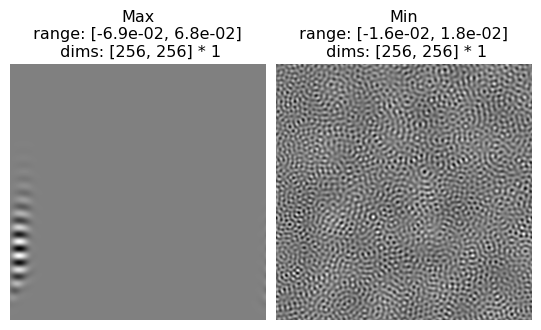
We can then visualize our outputs:
po.imshow(eig.eigendistortions, title=["Max", "Min"]);
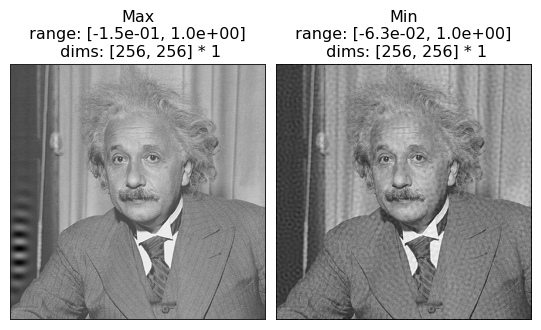
And we can add them to the reference image, to see what they look like (scaled up for visibility):
po.imshow(eig.image + 5*eig.eigendistortions, title=["Max", "Min"]);
Different target image#
Try using a different target image than the one of Einstein above and running eigendistortion synthesis until completion:
Loading other images
Try one of the other included images or use load_images to load one from disk.
img = # WRITE SOMETHING NEW HERE
img = img.to(DEVICE)
model = po.simul.LuminanceGainControl(
    kernel_size=(31, 31), pad_mode="circular",
    pretrained=True, cache_filt=True
)
model.to(DEVICE)
po.tools.remove_grad(model)
model.eval()
eig = po.synth.Eigendistortion(img, model)
eig.synthesize(max_iter=1000)
po.imshow([eig.eigendistortions, eig.image+5*eig.eigendistortions]);
Other models#
Try synthesizing eigendistortions with a different model! Try one of the other models from the frontend module.
If you want a more complex model, see the torchvision notebooks.