
Minimal metamer synthesis example#
See plenoptic docs for more details.
import plenoptic as po
import torch
# needed for the plotting/animating:
import matplotlib.pyplot as plt
%matplotlib inline
plt.rcParams['animation.html'] = 'html5'
# use single-threaded ffmpeg for animation writer
plt.rcParams['animation.writer'] = 'ffmpeg'
plt.rcParams['animation.ffmpeg_args'] = ['-threads', '1']
DEVICE = torch.device('cuda' if torch.cuda.is_available() else 'cpu')
The following code block:
initialize an image and a model
run metamer synthesis until convergence
img = po.data.einstein().to(DEVICE)
model = po.simul.LuminanceGainControl(
    kernel_size=(31, 31), pad_mode="circular",
    pretrained=True, cache_filt=True
)
model.to(DEVICE)
po.tools.remove_grad(model)
model.eval()
met = po.synth.Metamer(img, model)
met.synthesize(max_iter=1300, stop_criterion=1e-11, store_progress=10)
Next, we need to ensure that the metamer synthesis succeeded. In the previous example we worked through, I had ensured that we ran the synthesis for long enough that we didn’t need to check this, but in general, you do.
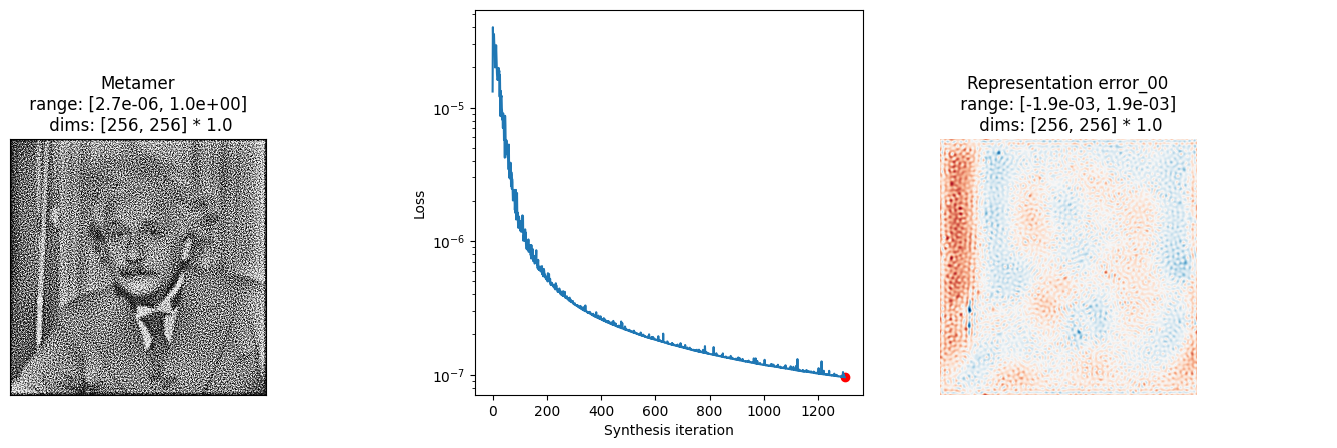
There are many possible visualizations one can make. We have a helper function that should help get you started. It shows the metamer, the synthesis loss over time, and (if possible) the representation error.
fig, _ = po.synth.metamer.plot_synthesis_status(met)
fig
In the above figure, we can see that the loss has decreased to a low value and, importantly, that it looks like it has stabilized.
The representation error is easier to understand if we view it over time, which we can do with the following helper function:
po.synth.metamer.animate(met)
/home/agent/workspace/neurorse_plenoptic-vss-2025_main/lib/python3.11/site-packages/plenoptic/synthesize/metamer.py:2144: UserWarning: Looks like representation is image-like, haven't fully thought out how to best handle rescaling color ranges yet!
  warnings.warn(
We can see that the representation error decreases relatively uniformly across the image.
Different target image#
Try using a different target image than the one of Einstein above and running metamer synthesis until completion:
Loading other images
Try one of the other included images or use load_images to load one from disk.
img = # WRITE SOMETHING NEW HERE
img = img.to(DEVICE)
met = po.synth.Metamer(img, model)
met.synthesize(max_iter=1300, stop_criterion=1e-11, store_progress=10)
po.synth.metamer.plot_synthesis_status(met);
And maybe animate to see what synthesis looks like?
po.synth.metamer.animate(met)
Different initial image#
While we often initialize from a patch of white noise, it can be interesting to start from a different image as well. Using one of the same tools as above for loading another image, initialize metamer synthesis from another starting point and run it to completion:
met = po.synth.Metamer(img, model)
met.setup(initial_image=) # FINISH THE CALL TO setup
met.synthesize(max_iter=1300, stop_criterion=1e-11, store_progress=10)
po.synth.metamer.plot_synthesis_status(met);
And maybe animate to see what synthesis looks like?
po.synth.metamer.animate(met)
Other models#
Try any of the above with a different model! Try one of the other models from the frontend module.
If you want a more complex model, see the texture or torchvision notebooks.